What is Ampchor?
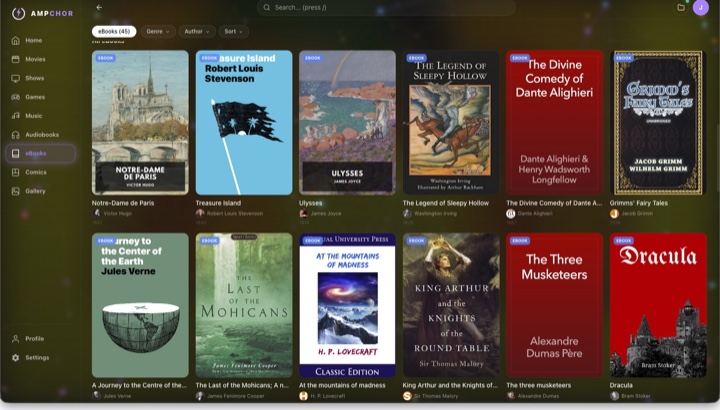
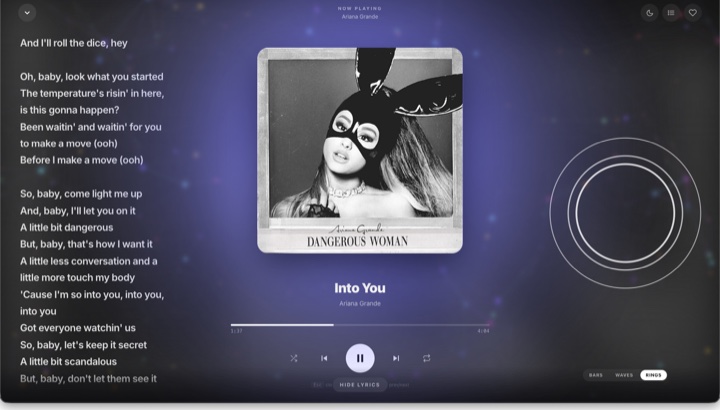
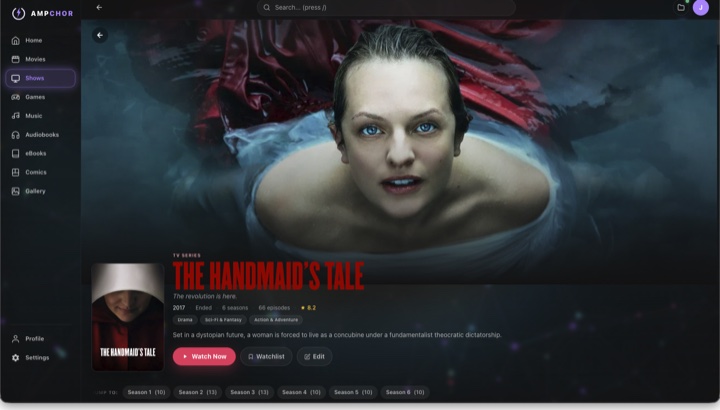
Ampchor is an app for your computer that turns your own media files into your own streaming service. It scans your movies, shows, music, audiobooks, ebooks, comics, photos and games, finds the artwork and details, then streams it all to your phone and TV. Like Netflix or Spotify, except the library is yours.
Free at home, forever
All of this on unlimited devices, on your own network. $0.
- Stream every library to the Ampchor apps on your phone, tablet and TV
- Movies, shows, music, audiobooks, ebooks, comics, manga, photos and retro games
- Unlimited devices on your home network
- Plays almost any file at full quality, even 4K. Your device plays the original directly, and your graphics card converts anything else on the fly
- Lossless audio in FLAC, ALAC and WAV
- Skip intro on shows
- Rip your CDs straight into your music library, in lossless FLAC or ALAC
- Game streaming to your phone and your TV (TV in beta)
- No account, no ads, no data collection, no tracking
Everything you’d want to know, in plain terms.
What data does Ampchor collect?
Nothing. Your media files stay in your own folders and never leave your computer. Your library and watch history live in a plain file on your own disk, we never see it. Streams go straight between your devices and nothing passes through a data center, so no one in the middle can see them, not even us. There is no account, no sign-up, no email and no ad networks. The one exception: an anonymized crash report if the app ever crashes, stripped of anything personal, with an off switch in Settings → Privacy.
How does pairing keep my library safe?
There are no accounts and no passwords. To connect a new device you type a short code shown on your computer’s screen or scan it, so no one can connect without physically seeing your screen. Each device then creates its own secret key and locks it in the device’s built-in safe, the same protected place your passwords already live. That key never leaves your device: not to Apple, not to Google, not to us. Every request your phone makes proves it really came from that phone, your computer checks the proof before answering and any device you haven’t paired gets nothing, locked out by default.
Will my movies and music lose quality?
No. When a device can play a file as-is, which is most of the time at home, it gets the original byte for byte, so true 4K plays exactly as it sits on your disk. If a device can’t play a file, your computer converts it on the fly with its graphics chip, fast and free, where other apps charge extra. Music plays lossless in FLAC, ALAC, WAV and dozens more. Away from home the stream adapts to your connection so playback stays smooth.
How is it safer than other platforms?
Two simple reasons. First, there’s nothing to steal: the big services keep millions of people’s information in one giant database, so a single hack can expose everyone at once, Ampchor keeps none of it, so there’s no vault to break into. It can’t leak information it never collected. Second, there are no accounts and no passwords, the very thing that gets phished, reused and leaked everywhere else simply doesn’t exist here. Your files stay on your own machine, and away from home your connection is scrambled the whole way so no one in the middle can see it, not even us.
What does it play?
Practically everything: movies, shows, music, audiobooks, ebooks, comics, photos and retro games, in just about any format your files come in. See every format below.
Can it really play my games?
Yes, and it treats them like the rest of your library. Point Ampchor at your ROMs and it identifies each one by fingerprint, gives it cover art and details, then plays it with real emulator cores built into the app, not a browser. It plays 21 classic consoles today and organizes the newer ones it can’t emulate yet, ready for when they land. Your computer does the work and streams the game to your phone, so you can play with a controller from anywhere in the house. One app for your movies, your music and your games, with no separate game manager to run alongside it.
What leaves my computer and what never does?
Almost nothing. Your files and your library never leave. Your computer fetches posters and artwork from public databases and anonymized crash reports are the only thing sent to us, one switch turns them off. The full table is below.
What do I need to run it?
A regular computer, Mac, Windows or Linux, with your files on it or on an external hard drive plugged into it. That computer is your home base: leave it on and your whole library is ready on your phone, tablet and TV, at home and away. No special hardware, no server in a closet, no tech degree.
Is it open source?
Not today and we’re open about why: staying closed lets an independent studio protect its original work, fund development and avoid handing a finished blueprint to the trillion-dollar companies we exist to be an alternative to. But everything that matters to you is open: it runs without an account, your media stays in plain files in your own folders, the library index is a plain file you can open yourself and nothing ever phones home. And credit where it’s due: Ampchor proudly stands on great open-source projects like FFmpeg, mpv, libretro and SQLite, with full license notices inside the app. We’d rather earn trust by showing exactly how your data is handled than ask you to take it on faith.
What it plays
Practically everything. Here’s what each library actually accepts:
| Library | Supported formats |
|---|---|
| Movies & TV |
|
| Music |
|
| Audiobooks | M4B with embedded chapters, plus chaptered MP3 / M4A folders. |
| Ebooks |
|
| Comics & manga | CBZ, CB7 and CBT. |
| Photos |
|
| Retro games |
Your ROMs get identified by fingerprint the same way your movies do, then given cover art and details, so your game shelf looks as good as the rest of your library. It plays them with real emulator cores built into the app, not a browser, and your computer streams the game to your phone so you can play with a controller. It also organizes newer systems it can’t yet emulate like PS2, PSP, GameCube, Wii, Switch and Xbox, they appear in your library with cover art ready for when emulation lands. |
Everything it does, side by side.
How Ampchor stacks up against Plex, Jellyfin and Emby, feature by feature.
Checked against each product's own documentation, August 2026. Every cell describes what you get out of the box, meaning default apps, a default install, no plugins and no paid tier. Think one is wrong? Tell us and we will fix it.
| Feature |  Ampchor Ampchor | Plex | Jellyfin | Emby |
|---|---|---|---|---|
| Set up in minutes with no accounts and no passwords, ever | Yes | Account required | Local account only | Local account only |
| A real app, no web browser to set up or manage | Yes | Browser to set up | Browser dashboard | Browser dashboard |
| Play retro games on your phone | Yes | No | No | No |
| Rip your own CDs into your library | macOS only | No | No | No |
| Download to your phone, play with zero signal | Yes | Costs extra | Depends on the app | Costs extra |
| Music | Yes | Separate app: Plexamp | Yes | Yes |
| Audiobooks | Yes | No audiobook library | Needs a plugin | Basic |
| Ebooks | Yes | No books library | Needs a plugin | Books library (pdf, epub, mobi) |
| Comics & manga | Yes | No books library | Needs a plugin | Books library (cbr, cbz) |
| Photos | Yes | Separate app: Plex Photos | Basic | Yes |
| Encrypted streaming out of the box, nothing to set up | Yes | Yes, cert from plex.tv | Set it up yourself | Set it up yourself |
| Hardware transcoding included free | Yes | Costs extra | Yes | Costs extra |
| Adjustable speed + bookmarks for audiobooks | Yes | No audiobook library | Needs a plugin | Basic |
| Skip intro | Yes | Costs extra | Needs a plugin | Costs extra |
| Unlimited devices at home | Yes | Yes | Yes | Limited without paying |
| Away-from-home streaming with no port-forwarding or setup | Yes, with Pro | Yes, on a paid plan | No | UPnP or port-forward |
| Connects straight to your computer | Yes | Direct, after plex.tv sign-in | Yes | Yes |
| Share with family & friends | Yes | Free at home, paid away | Yes | Yes |
| Works on any wifi, even a phone hotspot, no internet | Yes | Sign in first, then limited | Yes | Yes |
| No account or sign-up, ever | Yes | Account required | Yes | Account optional |
| No ads, ever | Yes | Ads in their free channels | Yes | Yes |
| No tracking, your data is never collected or sold | Yes | Collected, selling is opt-out | Yes | Yes |
| Your files never leave your computer | Yes | Metadata to plex.tv | Yes | Yes |
| Nothing to expire, yours to keep forever | Yes | Features stop if it lapses | Yes | Yes |
| Open source | No | Closed source | Yes | Server is closed source |
| Smart TV app (Android TV & Fire TV) | Built, not released yet | Yes | Yes | Yes |
| Live TV & DVR (with a tuner) | No | DVR costs extra | Yes | DVR costs extra |